Gulya Script: A Handmade Seller's Honest Take on This Script Font
I remember the exact moment I opened the Gulya Script file for the first time. I was sitting at my kitchen table, a stack of plain kraft labels in front of me, trying to figure out why my usual go-to fonts felt flat on my new candle packaging. I needed something with personality—something that would make my small-batch soy candles feel like a thoughtful gift, not just another jar on a shelf. I typed a quick test phrase: Lavender + Cedar. And there it was. The loops curved with just enough weight, the connecting strokes felt intentional, and the whole phrase read like it had been written by hand with a steady, confident pen. That was the moment Gulya Script stopped being just another font in my downloads folder and became a working part of my shop.
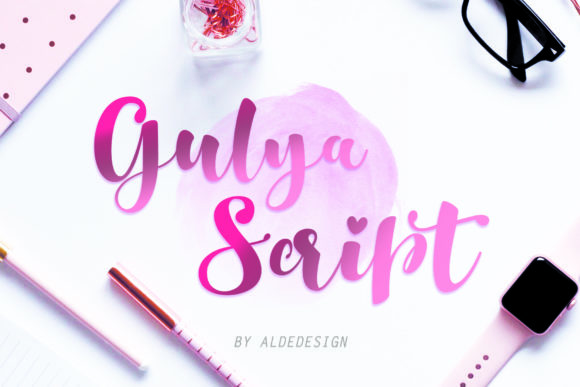
Gulya Script is a beautiful script typeface that carries a distinctly feminine energy while keeping a striking, deliberate presence. It never feels fragile or fussy. Instead, it strikes a balance between delicate and bold—cute enough to feel personal, strong enough to hold its own on a product label or a storefront sign. For makers like me who sell physical goods, that balance is everything. You want your lettering to draw someone in without shouting, and Gulya manages that with natural ease.
The First Test: Candle Labels and Product Tags
My first real project with Gulya Script was updating the labels for my hand-poured candle line. I design and print my own labels at home using a basic inkjet printer and matte sticker paper, so readability at small sizes is non-negotiable. Some script fonts turn into unreadable spaghetti when you scale them down to a two-inch label. Gulya Script held its shape. I tested it at 18 points for the scent name and 11 points for the small batch number on the back. The letters stayed open, the ascenders and descenders kept their proportions, and I didn't lose a single character to blurry edges or cramped spacing.
For product tags—those little hang tags I attach to gift sets—I used Gulya Script for the main product name and paired it with a clean sans serif font underneath for ingredients and care instructions. That pairing is where the font really starts to shine. The script draws the eye first, and the sans serif provides a quiet anchor so the design doesn't feel overwhelming. I have tested this combination on kraft tags, glossy white tags, and even recycled cotton ribbon tags sewn into fabric bags. Every material reads clearly.
Wedding Invitations and Personal Stationery
If you design printable invitations or digital templates, Gulya Script belongs in your toolkit. I created a sample wedding invitation suite for a friend's engagement party—just a simple digital mockup I shared with her for feedback. The couple's names appeared in Gulya Script at the top, the ceremony details in a simple serif font below, and a single decorative swash from the font's alternate characters framed the bottom corner. The result looked like a custom calligraphy piece, not a computer-generated layout. The bride-to-be asked if I had written it by hand. That is the effect this typeface has: it feels personal, human, and special.
For greeting cards, birthday invitations, and thank-you notes, Gulya Script works beautifully for short phrases and names. I do not recommend it for long body text—script fonts generally tire the eye after a few lines—but for a single line of wording, a recipient name, or a heartfelt closing like With love, it is pure gold. I have used it on printable birthday cards that I sell as digital downloads, and customers consistently leave feedback saying the lettering makes the card feel finished and professional.
Wall Art, Signs, and Home Decor Printables
Printable wall art is one of my best-selling categories, and Gulya Script has become my go-to display font for quotes and single-word prints. I recently designed a set of farmhouse-style prints with words like Gather, Bloom, and Home rendered in the font at a large point size. The strokes read beautifully from across a room, which is essential for decor pieces that hang above a sofa or on a gallery wall. The font's natural rhythm gives each word a handmade feel that fits perfectly with rustic, modern farmhouse, and boho aesthetics.
For signs—whether digitalmockups for shop listings or actual printed signage for craft fairs—Gulya Script holds up well at larger sizes. I tested a design for a wooden welcome sign I planned to sell at a local market. The word Welcome in Gulya Script paired with a bold sans serif underneath for the family name. Even at 200 points in the design software, the letterforms remained clean and proportional. No awkward gaps, no broken curves. That kind of reliability matters when you are producing physical inventory for a show.
Stickers, Planner Pages, and Small Decals
Sticker makers and planner enthusiasts will appreciate how well Gulya Script translates to small-format adhesive products. I cut my own stickers using a Silhouette machine, and script fonts can be notoriously tricky with fine blade cuts. Thin connecting strokes sometimes lift off the backing or tear during weeding. Gulya Script's strokes have enough body to hold together during cutting and weeding, even on small phrases under two inches wide. I have made sticker sheets with weekly planner headers like Monday, Goals, and Notes, and each word cut cleanly without extra fussing.
For laptop decals, water bottle stickers, and handmade product labels, the font's personality adds a layer of charm that standard sans serif stickers cannot match. I design seasonal sticker sets for my shop—holiday gift tags, Christmas labels, Valentine's Day cards—and Gulya Script carries that seasonal warmth naturally. The font does not rely on decorative extras to feel special; its letterforms do the work on their own.
Boutique Packaging and Shop Branding
Brand consistency is something I think about a lot, especially as a small shop owner selling across multiple channels. My logo uses a custom wordmark, but for sub-branding—product line names, collection titles, limited edition stamps—I turned to Gulya Script. It gives those secondary brand elements a cohesive look without requiring me to commission custom lettering for every new product. The font has become part of my visual identity, and customers recognize it when they see it on packaging, social media graphics, and product photos.
For boutique packaging, I use Gulya Script on tissue paper inserts, small instruction cards, and branded stickers that seal the mailers. The font's feminine but striking presence fits well with handmade beauty products, bath and body items, small-batch food goods, and artisan gifts. If you sell products that lean toward a soft, romantic, or thoughtfully crafted aesthetic, Gulya Script will amplify that feeling without competing with your product photography or packaging design.
Practical Notes for Cutting Machines and Printing
For anyone using Cricut or Silhouette machines, here is a practical tip: when you upload Gulya Script into your design software, make sure to check the font preview before cutting. Some script fonts require you to enable ligatures or stylistic alternates in the character map to get the smoothest connections between letters. Gulya Script includes alternate characters and ligatures that improve the flow of certain letter pairs, especially when you are working with names or custom phrases. Take a few minutes to test those alternates before you finalize your design—it makes a noticeable difference in the final cut.
For printed products like stickers, cards, and labels, always do a small test print before committing to a full run. Check readability at your intended size, especially if you are printing on textured paper or kraft materials. Gulya Script performs well on matte and uncoated papers, but glossy surfaces can sometimes cause fine script details to look slightly washed out. A quick test print saves you time and materials.
Font Pairing Ideas and Design Flexibility
Gulya Script pairs naturally with clean sans serif fonts for a modern, approachable look. I use it most often with a simple geometric sans serif for body text, ingredient lists, and secondary information. For a more traditional feel, pair it with a classic serif font—think of the script as the headline and the serif as the supporting voice. If you want a playful, hand-lettered vibe, combine Gulya Script with a simple handwritten font that does not compete with its curves. The key is to let the script be the hero and keep the companion font simple and restrained.
In editorial design—whether that is a lookbook, a product catalog, or a social media graphic—Gulya Script works well for pull quotes, section headers, and decorative accents. It brings a human touch to digital layouts that might otherwise feel too clean or impersonal. I have used it in mockup previews for my shop listings, and it consistently makes the product images feel warmer and more inviting.
Licensing and Commercial Use Notes
Before you put Gulya Script to work on physical products or digital downloads, check the commercial license that comes with the font. Script Amp and Fonts categories sometimes include different licensing tiers, and you want to make sure your use case is covered. If you plan to sell physical merchandise with the font printed on it—mugs, shirts, tote bags, candles, signs—confirm that the license includes commercial use for physical products. If you sell digital templates, printables, or SVG-style designs that include the font as part of the design, check whether that falls under desktop use, web use, or a separate commercial tier. A quick read of the license agreement saves you from future headaches and keeps your shop compliant.
The font file itself includes all the styles, alternates, ligatures, and swashes you see in the preview. Make sure you install the full font family so those features are available in your design software. If you are using a program like Adobe Illustrator, Canva, Affinity Designer, or Cricut Design Space, the alternates will appear in the Glyphs panel or special characters menu. Explore them. They add polish to your final designs and help you avoid the cookie-cutter look that comes from using the default letterforms every time.
Gulya Script has earned a permanent spot in my font library, right alongside my most-used serif and sans serif families. It is versatile enough for seasonal crafts, reliable enough for production runs, and beautiful enough to make my products feel like they came from a designer's studio, not a kitchen table. That is exactly what I look for in a premium font—something that raises the bar on everything I make, one label, one card, and one sign at a time.